
In the ever-evolving world of WordPress site building, tools that promise speed, ease, and innovation often capture the attention of developers, bloggers, and business owners alike. SeedProd, a popular drag-and-drop page builder, has been a staple in the ecosystem for years, but its recent foray into AI-driven theme generation via ai.seedprod.com aims to revolutionize how users create entire websites.
Launched as part of SeedProd’s expansion into full-site editing, this AI tool claims to generate complete WordPress themes in under a minute based on simple prompts. H
owever, as with any emerging technology, it’s not without its limitations. In this review, we’ll explore SeedProd’s core page builder features, dissect the AI offering in detail, weigh the pros and cons from user feedback on platforms like Reddit, G2, and beyond.
We’ll also analyze pricing ambiguities and compare it to alternatives, helping you decide if SeedProd’s AI is the future of WordPress or just another hyped website builder.
Understanding SeedProd: The Foundation of the Page Builder
SeedProd started as a simple “coming soon” page plugin but has grown into a robust WordPress website builder.
As of 2026, it’s trusted by over a million users for creating landing pages, custom themes, and full sites without coding.
The plugin integrates seamlessly with self-hosted WordPress sites, allowing users to drag and drop elements to build headers, footers, pages, posts, archives, sidebars, and even WooCommerce layouts.
Its core appeal lies in accessibility: no design skills required, thanks to over 200 pre-built themes, 300+ templates, 90+ pro blocks, and smart sections like calls-to-action.
At its heart, SeedProd is a visual editor that empowers non-developers. You install it via the WordPress plugin repository, activate it, and start building.
The interface is intuitive, with a live preview mode that lets you tweak elements in real-time. Features include responsive design for mobile optimization, SEO-friendly code for faster loading, spam protection via ReCaptcha, and integrations with email services like MailChimp or Zapier for lead generation.
For e-commerce, it supports WooCommerce and Easy Digital Downloads, enabling custom product pages that convert – which is a big plus.
Users praise its speed—pages load quickly due to bloat-free code—and versatility. For instance, you can create maintenance modes, 404 error pages that double as lead magnets, or opt-in forms without leaving WordPress.
Dynamic text and access controls add layers of functionality, making it ideal for agencies, photographers, or bloggers needing quick customizations. However, it’s not perfect; some advanced users note it lacks the depth of competitors like Elementor for intricate animations or Divi for lifetime updates. For instance, I’ve personally used Divi since they offered a lifetime deal on in the early days on over 1,200 websites and have updated it several times over the years.
SeedProd’s evolution reflects broader trends in WordPress. With Gutenberg’s block-based editing dominating since 2018, SeedProd complements it by offering a more polished drag-and-drop experience. It’s not a replacement for core WordPress but an enhancer, especially for those avoiding code-heavy themes
The Rise of AI in WordPress: Introducing SeedProd’s AI Theme Generator
Artificial intelligence has infiltrated WordPress, from content generators like Jetpack AI to full-site builders like Telex or PressMeGPT. SeedProd’s entry, accessible at ai.seedprod.com, positions it as an “AI Theme Builder” that creates entire websites from a business description.
Launched in late 2024, it promises to democratize site creation: input a prompt like “A modern e-commerce site for handmade jewelry,” and the AI generates pages, copy, images, and layouts in 60 seconds.
This tool builds on SeedProd’s existing theme builder, marked as “New” in their features list. It’s powered by undisclosed AI models (likely fine-tuned versions of GPT or similar), focusing on rapid prototyping. The integration is tight: generated themes are editable within SeedProd’s drag-and-drop interface, but the AI magic happens upfront.
Why does this matter? Traditional theme creation can take hours or days, involving wire-framing, coding, and testing. SeedProd’s AI shortcuts this, appealing to solopreneurs, agencies, freelancer web designers, marketers, or small businesses wanting professional sites without hiring developers. It aligns with 2026’s AI boom, where tools like 10Web or Elementor AI also automate design.
How the AI Theme Generator Works: A Step-by-Step Breakdown
Using SeedProd is straightforward, but let’s dissect the process for clarity.
- Access the Tool: Visit the site—no WordPress install needed initially. Sign up for a free account to start. Requires a valid email address.
- Input Your Prompt: Describe your business or site idea. The AI uses this to infer structure, colors, fonts, and content. For example, a “fitness coaching site” might yield a homepage with hero sections, about pages, blog templates, and contact forms.
- Generation: Hit “Generate.” In under a minute, it produces a full theme, including multiple pages (home, about, services, contact), AI-written copy, and placeholder images. Themes are responsive and optimized for speed.
- Preview and Download: View the site in a browser preview. If satisfied, download as a ZIP file for import into WordPress via SeedProd. Importantly, download before extensive previewing, as some users report preview sessions locking edits or exports.ai.seedprod.com
- Import and Customize: In WordPress, activate SeedProd, import the theme, and tweak with the builder. Add blocks, adjust layouts, or integrate plugins.
Features shine in simplicity: AI-generated copy is related to your AI prompt, images are stock-like but you can replace them in WordPress, and themes support full-site editing.
However, the process reveals cracks. The free tier limits you to 3 theme generations lifetime—enough for testing, but restrictive for iteration. Once generated, you can’t use AI to modify the theme; edits are manual via SeedProd’s editor on your WordPress install.
No options for adding custom images, logos, fonts, or icons during AI generation—those come post-import.
Compatibility is SeedProd-exclusive; it doesn’t output native Gutenberg blocks or work seamlessly with Elementor, Divi, or Beaver Builder. If you’re locked into another ecosystem, migration is manual and tedious.
Pros of SeedProd’s AI Theme Generator
Despite limitations, the tool has merits.
- Speed and Efficiency: Generating a site in 60 seconds is transformative. Users report saving “days” on initial setups, ideal for MVPs or client pitches.
- User-Friendly for Beginners: No coding needed. The drag-and-drop post-generation editing makes it accessible, with templates reducing design paralysis.
- Integration with SeedProd Ecosystem: Seamless with WooCommerce, email tools, and SEO features. Generated themes are bloat-free, boosting performance scores.
- Cost-Effective for Basics: Free tier for trials, and paid plans unlock more (though AI specifics are vague).
- AI-Enhanced Creativity: Prompts inspire unique designs, like niche sites for “eco-friendly pet products,” complete with tailored copy.

Reviews on G2 highlight these: “The AI builder is a game-changer for quick launches,” says one user, praising its intuitive flow.
Cons of SeedProd’s AI Theme Generator: The Harsh Realities
While promising, the AI falls short in several areas, as outlined by user experiences and tool mechanics.
- Limited Free Generations: Only 3 free themes lifetime. After that, you’re pushed to paid plans. This stifles experimentation; one Reddit user complained, “Burned through my free tries on bad prompts, now stuck paying.”
- No AI Modifications Post-Generation: The AI is one-shot. Want to tweak with new prompts? Manual edits only. This frustrates users expecting iterative AI, like in Cursor or V0. A G2 reviewer noted, “Great start, but no way to refine with AI—feels half-baked.”
- Lack of Customization Options: Can’t add images, logos, fonts, or icons during generation. Outputs are generic, requiring post-import work. On X, users lament “bland designs needing heavy overhaul.” One post called it “limited to 2-3 styles for everything.”
- Preview vs. Download Pitfall: Preview the site before downloading, and you might lose download access without re-generating (costing credits). Advice: Download first. This “gotcha” irks users, with Reddit discussions highlighting “frustrating workflow.” Update: I was able to download my test theme after I previewed but had to refresh the page while signed in to see it. I thought I lost it forever initially.
- SeedProd-Only Compatibility: Works exclusively with SeedProd—no native support for Gutenberg, Elementor, Divi, etc. Switching builders means rebuilding. A WPBeginner comparison notes this as a lock-in con.
- Unclear Pricing for AI: The pricing page is ambiguous. Elite plan ($239.60/year) includes “Theme Builder (New),” but no explicit AI mention or credit details. Lower tiers (1-5 sites) lack AI, per comparisons. Users on Trustpilot complain about “hidden costs for full AI access.”
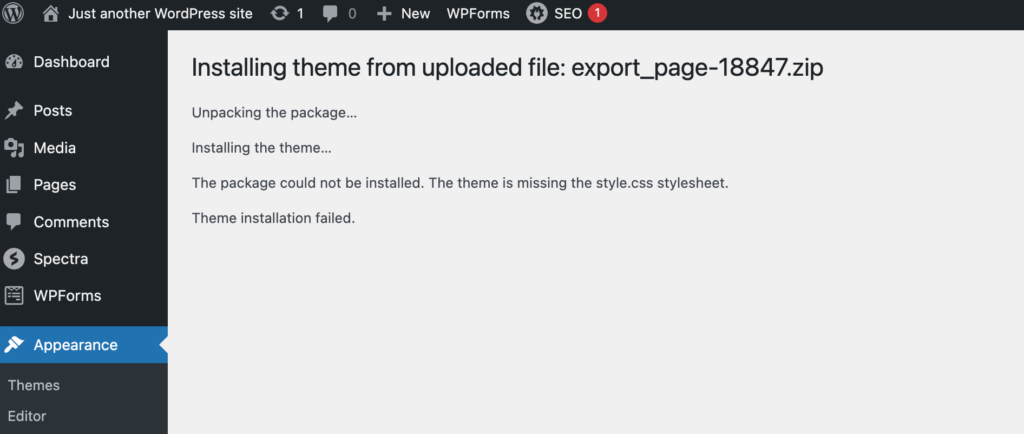
- Can’t install on a fresh copy WordPress. Lastly and most importantly, I couldn’t get a SeedProd generated theme installed on a fresh WordPress install. It said I was missing a critical file “style.css” which is a non-starter. Maybe I was missing prerequisites. ¯_(ツ)_/¯ There was not any instruction provided on the website or even a readme.txt file.
These cons echo broader AI tool critiques: overpromise on flexibility, underdeliver on polish.
User Feedback: The Good, Bad, and Ugly from Real Reviews
SeedProd’s AI has mixed reception. Positive voices on G2 praise ease: “Revolutionized our WordPress experience,” with 4.5+ stars for intuitiveness. WPForms calls it “affordable and fast.
Negatives surface on Reddit, X, and even Trustpilot with 2.8 stars. A Reddit user mentioned using SeedProd AI but implied cleanup time: “Spent more time fixing than building.” Reddit blogging thread Another thread critiques page builders, with SeedProd lumped in for speed issues.
On G2, cons include template limitations: “Generous free plan, but AI feels restricted.” ProductHunt has scant mentions, but related AI tools draw flak for “bloated outputs.”
X posts highlight generics: “Fucks up at basic steps, more time cleaning mess.” (@neptune_wind) Another: “Cant create different designs, stuck to 2-3 styles.”(@work_ayushUX) These align with cons like no post-AI edits.
Overall, while not overwhelmingly negative (perhaps due to newness), feedback underscores the provided drawbacks. The fact I couldn’t get it installed on a clean WordPress install also says a lot.
Pricing Analysis: Navigating the Ambiguities
SeedProd’s pricing is tiered but opaque for AI. Elite ($239.60/year, 100 sites) includes Theme Builder, likely encompassing AI.
Lower plans (e.g., Basic for 1 site, ~$39/year) omit it. No clear credits—free is 3 generations, paid unlimited?
Unspecified, leading to frustration. 14-day refund helps, but clarity lacks. Compared to Elementor Pro ($59/year with AI), it’s pricier for similar features.
Alternatives to SeedProd AI
If cons deter you, consider:
- Elementor AI: Iterative edits, Gutenberg-compatible, $59/year.wpbeginner.com
- Divi AI: Unlimited generations, elegant themes, lifetime ~$249.
- 10Web AI Builder: Full-site AI, hosting included, ~$10/month.
- Jetpack AI: Content-focused, free tier.
- Telex by Automattic: Experimental block generator, free for now.
- PressMeGPT: AI WordPress Builder & Theme Generator. Allows you to modify with prompts. Supports Gutenberg Blocks, FSE, and other builders like Elementor and Divi.
These offer better flexibility or value.
Conclusion: Is SeedProd’s AI Worth It?
SeedProd’s page builder is solid for landing pages, but the AI theme generator at ai.seedprod.com is a mixed bag.
Pros like speed are offset by cons: limited free uses, no AI edits, missing customizations, preview pitfalls, ecosystem lock-in, and pricing fog. User feedback from Reddit like this thread, G2 reviews here, and X such as this post highlights these as real pain points.
For quick prototypes, it’s handy; for production, look elsewhere until refinements.