Jetpack AI Assistant: The Everyday AI for WordPress Content
Jetpack AI is WordPress’s built-in AI Assistant and stands as one of the most widely adopted AI features for everyday users.
Launched back in 2023 and continuously refined through 2025 and into 2026, it integrates directly into the Gutenberg block editor, making it feel like a native extension rather than a bolted-on tool.
This seamless embedding means you never have to leave your familiar WordPress workspace to harness powerful AI capabilities.
Unlike standalone AI writers such as ChatGPT or Jasper, Jetpack AI “speaks fluent WordPress.” It understands contextual elements like your site’s overall tone, SEO requirements, existing block structures, and even theme-specific styling. This makes it particularly effective for bloggers, marketers, and site owners who want AI assistance tailored to the WordPress ecosystem. For more details on its capabilities, visit the official Jetpack AI page.
Think of Jetpack AI as the Microsoft Copilot equivalent for WordPress—it’s designed to enhance your existing workflow with intelligent suggestions and generations, but it doesn’t aim to build an entire WordPress website from scratch with AI (that’s where tools like Telex or PressMeGPT.com come into play for more advanced site-building automation).
Key Features
Jetpack AI Assistant packs a versatile set of tools that cover the full spectrum of content creation and refinement. Here’s a deeper look at each:
- Prompt-Based Generation This is the core powerhouse. Simply type a natural-language prompt, and the AI generates complete content. For example, enter “Create a comparison table for 5 popular WordPress hosting providers including price, uptime, support, and speed” to instantly produce a structured, ready-to-customize table. Users report this saves significant time—often 15+ minutes per complex element—compared to manual creation in tools like Google Sheets or code editors. It excels at lists, tables, step-by-step guides, motivational posts, information articles, or full blog drafts.
- Tone and Style Adaptation One of the standout features is its ability to shift content tone instantly. Need a formal introduction for a business post? Or something humorous and engaging for a lifestyle blog? Select options like “Formal,” “Conversational,” “Humorous,” “Optimistic,” “Serious,” “Provocative,” or “Empathetic.” The AI rewrites accordingly, maintaining your voice while adding flair. This is especially useful for multilingual sites or when targeting different audience segments.
- Image and Visual Tools Generate custom AI images directly from prompts or based on your post content—perfect for featured images, logos, or illustrations. Recent updates (as of 2025) allow one-click featured image suggestions tied to your text, reducing reliance on stock libraries or external generators.
- SEO and Optimization The AI auto-generates compelling titles, meta descriptions, summaries, and readability improvements. It flags long sentences, complex jargon, ambiguous terms, or grammar issues, then suggests fixes to boost your readability score. This helps ensure content performs better in search engines without manual SEO audits.
- Forms, Layouts, and More Build interactive elements like contact forms with pre-populated fields (e.g., country dropdowns), FAQs, calls-to-action, or feedback surveys in seconds. For instance, prompt “Create a registration form for a global event with fields for name, email, preferred session, and dietary preferences,” and get a ready-to-use form block.
- Grammar, Proofreading, and Translation Advanced spelling/grammar checks go beyond basics, suggesting context-aware improvements. Multilingual support allows translations into numerous languages, making it ideal for global audiences. This breaks down barriers and enables quick localization of posts.
These features are powered by models like OpenAI’s GPT series (notably GPT-3.5 Turbo as of recent updates, with potential shifts based on performance), fine-tuned for WordPress contexts.
How to Access and Get Started: Step-by-Step Guide
Getting up and running is remarkably simple—no API keys, external accounts, or complex setups required.
- Install Jetpack: For self-hosted sites, head to Plugins > Add New in your WordPress dashboard, search for “Jetpack,” install, and activate it. Connect to WordPress.com (required for AI features). On WordPress.com-hosted sites, it’s pre-enabled.
- Enable AI: Navigate to Jetpack → My Jetpack → AI section to view your request usage and upgrade if needed.
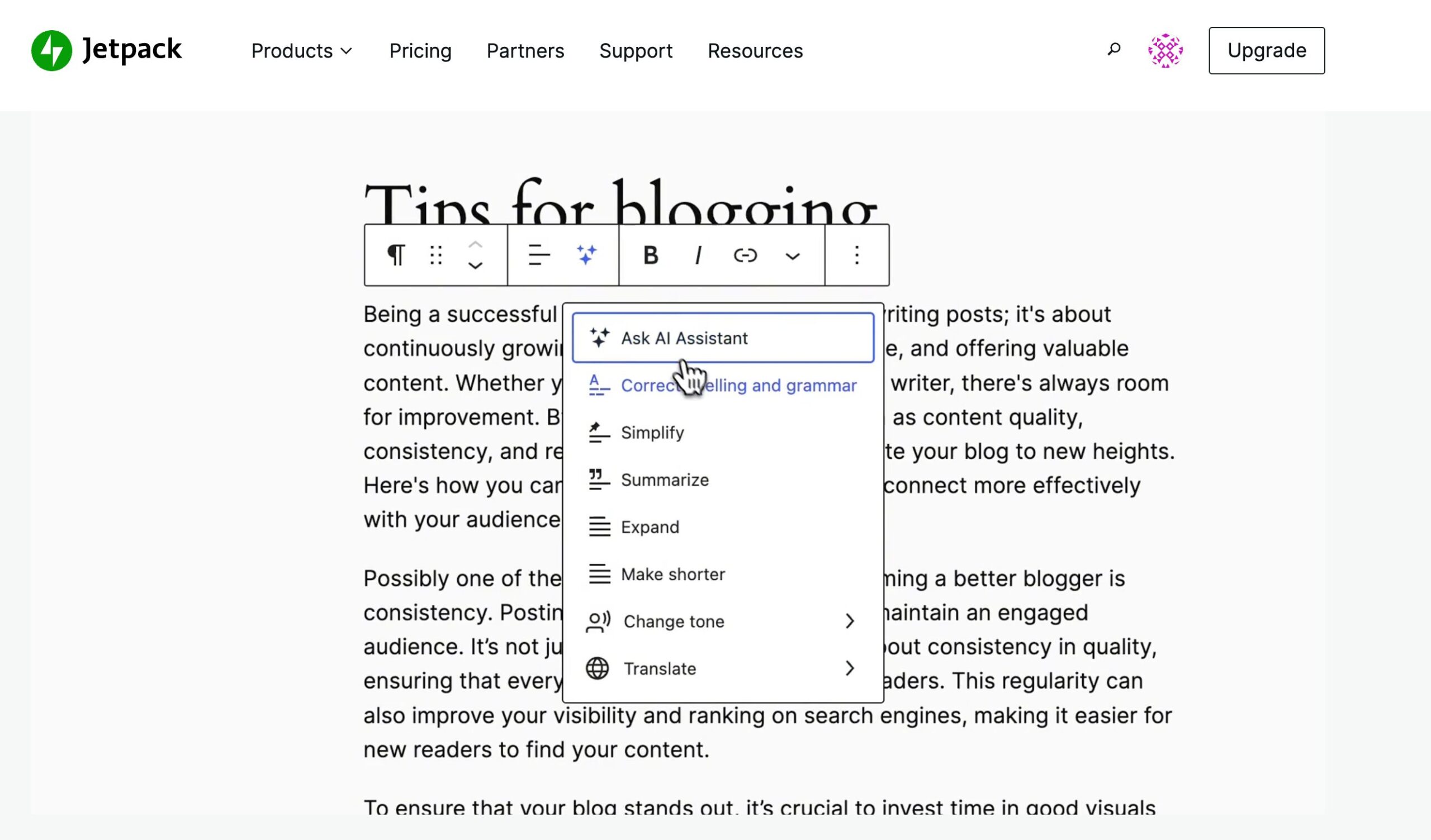
- Insert the Block: In the Gutenberg editor, click the + icon or type “/ai” in a new paragraph. Select the “AI Assistant” block.
- Start Prompting: Click “Write with AI…” or use toolbar options like “Correct spelling and grammar,” “Summarize,” “Expand,” or “Change tone.” Provide prompts and iterate—refine outputs with follow-up requests.
- Track Usage: Check all-time requests in the My Jetpack dashboard. Provide optional feedback after generations to help improve the tool.
Pro tip: Use the block toolbar’s sparkle icon for quick actions on existing text. It’s mobile-friendly in theory, though full editing shines on desktop.
Pricing Breakdown
Pricing is designed for sustainability, given the computational costs of AI queries.
- Free Starter Tier: Up to 20 lifetime requests for new users—perfect for testing all features without commitment.
- Paid Upgrade: Approximately $9.95/month (often ~$4.95–$5/month with first-year discounts of 45–50%; renews at full price). This unlocks higher limits (hundreds per month for most bloggers, with fair usage policies), priority support, and unlimited access to core tools.
- No Per-Word Charges: Unlike many competitors, it’s a flat subscription.
- WordPress.com Perks: Temporary free access on all plans has been offered periodically, though this is experimental and subject to change.
For heavy users, the paid tier proves cost-effective—saving hours per post translates to real ROI.
User Feedback and Real-World Experiences
User sentiment remains overwhelmingly positive, with high adoption among bloggers, marketers, small business owners, and non-technical creators. Reviews on platforms like WordPress.org, G2, and independent blogs give it consistent 4.5+ stars.
Strengths frequently mentioned:
- Massive time savings: “Cut writing time in half for routine posts” or “Saves 1-1.5 hours per post.”
- Seamless integration: “Feels like chatting with a colleague right in the editor.”
- Practical wins: Quick tables, forms, grammar fixes, and multilingual support stand out.
- Workflow boost: Ideal for “lazy Sundays” drafting or non-writers managing sites (e.g., school admins updating announcements).
Critiques are constructive:
- Occasional generic output on very niche topics.
- Rare hallucinations or inaccuracies—always review and edit.
- Request limits can frustrate heavy users, pushing upgrades.
- Privacy notes: Prompts process on servers (via OpenAI API), but Automattic prioritizes security with opt-outs; data isn’t used for training in API mode.
By 2026, enhancements like better multilingual support, tighter Gutenberg integration, and form AI have elevated satisfaction. Users often rate it 8.5/10 or higher, calling it “worth $10/month” for consistent productivity gains.
Comparisons to Other Tools
Jetpack AI shines against alternatives:
- Vs. ChatGPT (free tier): More WordPress-native, no copy-paste needed, better for tables/forms.
- Vs. Copy.ai or Jasper: Cheaper for blog content, less marketing-focused but superior in-editor flow.
- Vs. Elementor AI or Divi AI: Broader Gutenberg compatibility, not builder-specific.
- Vs. advanced plugins like AI Engine: Simpler, official support, but fewer custom AI features.
For pure content creation in WordPress, Jetpack often wins for ease and integration.
Why Jetpack AI Excels for Non-Technical Creators
Jetpack AI democratizes high-quality content for freelancers, e-commerce owners, hobby bloggers, and agencies. It turns ideas into polished, SEO-ready posts without external tools, letting you focus on strategy and creativity. As AI evolves, Jetpack continues updating—making it a reliable, future-proof assistant in the WordPress ecosystem.